from janehansen
Thousands of protesters gathered at Copenhagen's City Hall Square chanting “Hands Off Greenland” and “Greenland for Greenlanders”
https://m.youtube.com/watch?v=A8uimztI9gg
Read the latest posts from Paper.wf.
from janehansen
Thousands of protesters gathered at Copenhagen's City Hall Square chanting “Hands Off Greenland” and “Greenland for Greenlanders”
https://m.youtube.com/watch?v=A8uimztI9gg
from janehansen
Read more...from janehansen
Rapporten om Hamasterroristernes forbrydelser den 7. oktober rummer over 10.000 fotografier og videoer samt 430 vidneudsagn om bestialske drab og ubeskrivelig tortur
https://denkorteavis.dk/2026/den-7-oktober-2023-er-datoen-vi-aldrig-maa-glemme/
from janehansen
Reform UK is Britain's fastest growing political party. Join us to fix broken Britain with common sense policies
from janehansen
These terrible scenes out of Paris speak for themselves. One, dead and hundreds injured as muslims rioted and looted across France last night
from Kernuac en español
#retos #retosdeescritura
Asi como los poemas cortos que he ido escribiendo, aunque no todos han sido publicados, tambien he participado en “retos de escritura”. En esta sección iré recopilando esos retos con sus respectivas consignas. Espero que les gusten.
me tatué tu perfume; y con tus recuerdos pinté los muros de mi habitación.
(Cristhian Vega Cortes, 2026-06-04)
Y seguía en pie, con su escudo roto amortiguando cada palabra que intentaba incrustarse en el; En la última, sus rodillas besaron el suelo.
(Cristhian Vega Cortes, 2026-05-26)
El lapislazuli que adorna mi cuello vestigio de que alguna vez fuimos uno...
(Cristhian Vega Cortes, 2026-05-22)
La paz floreció sobre los prados teñidos de esperanza.
(Cristhian Vega Cortes, 2026-05-21)
Se alinearon sus espaldas; la distancia se hizo infinita a cada paso que daban.
(Cristhian Vega Cortés, 2026-05-21)
Su perfume sigue ahi...
(Cristhian Vega Cortes, 2026-05-21)
Nunca más se escuchó ese piano; el cargador decidió, simplemente, no conectar.
(Cristhian Vega Cortes, 2026-05-20)
querer cortar el viento, con el filo de una katana.
(Cristhian Vega Cortes, 2026-05-18)
La rosa crece y el cielo mira y entre ellos, en silencio camina seguro el tiempo, y con él, eso que llamamos vida.
(Cristhian Vega Cortés, 2026-05-16)
Día 64, no supero tu adios.
(Cristhian Vega Cortés 2026-05-16)
Versos que empujaban al abismo ahora perdidos en el limbo; el texto, en pixeles, se desvaneció la bateria murió de inanición...
(Cristhian Vega Cortes, 2026-05-16)
...el final de un camino, inevitable.
(Cristhian Vega Cortes, 2026-05-10)
Eres un pasaje prescindible de una melodia virtuosa.
(Cristhian Vega Cortes, 2026-05-10)
Eres la clave que da sentido a las notas de mi pentagrama.
(Cristhian Vega Cortes, 2026-05-08)
Abordamos juntos el tren, pero nos bajamos en estaciones separadas.
(Cristhian Vega Cortes, 2026-05-08)
Nube que mantiene mi sol en cautiverio
(Cristhian Vega Cortes, 2026-05-05)
Reiniciar Sistema.
(Cristhian Vega Cortes, 2026-05-05)
Calma mis ansias de hablarte, con el húmedo silencio de donde brotan tus palabras.
(Cristhian Vega Cortes, 2026-05-05)
Dos universos condensados en tu rostro.
(Cristhian Vega Cortes, 2026-05-03)
Solo veo en escala de grises, dia a dia...
(Cristhian Vega Cortes, 2026-05-03)
Eres la perfecta sinfonía que espero interpretar algun día.
(Cristhian Vega Cortes, 2026-05-01)
from @[email protected]
a semana pasada fixo xa dous anos da defensa da miña tese de doutoramento: xénero ultra: mobilizacións afectivas na política de xénero de vox. neste traballo de máis de catro anos analicei a sentimentalidade política de vox, propoñendo a observación do amor como un dos elementos afectivos centrais da ultradereita española. dous anos despois, considero que esta idea continua a ser vixente, sobre todo nos espazos militantes e de base ultra. deste xeito, fai un mes, un militante de ultradereita española contábame durante unha entrevista que el fora ao exército “por amor a España” e que estaba involucrado no seu partido ultra tamén “por amor a España”. o amor (á patria) continua presente, segue a ser unha ferramenta de activación e mobilización política.

os marcos afectivos propostos pola ultradereita e as formas de sentir que ten a súa militancia son dous procesos co-constitutivos que se desenvolven dentro dun mesmo sistema político gramatical que, seguindo a brigitte bargetz (2019), eu denomino a gramática política do amor. esta gramática política é o elemento que permite o traspaso de información ideolóxica e afectiva entre o nivel meso-político do partido e o micro-político dos seus militantes. ao mesmo que na gramática lingüística, a gramática afectiva establece cales son as pautas dos elementos políticos e afectivos, así como determina a súa organización e combinación.
a comprensión do amor coma un sistema político gramatical de sentimentos non significa que os partidos de ultradereita unicamente mobilicen o amor. entendelo como unha gramática política significa ter en conta ao amor como a guía afectiva que establece o funcionamento e a conexión doutros marcos afectivos (coma pode ser o medo, o asco ou o odio) co sentir plural das súas militancias. o amor proporciona un fío argumental, dános un sistema gramatical que une, guía e conecta a acción política partidista e militante. por exemplo, santiago abascal, nun discurso que fixo nunha das festas políticas do partido ultra, puxo en evidencia o fío do amor:
“amades a vosa patria, fachas. queredes a españa, fachas. defendedes as fronteiras de españa, as paredes do voso fogar, xenófobos e fachas. parécevos que a inmigración debe ser controlada dalgún xeito, racistas e fachas. gostades das tradicións, as festas populares e as procesións de españa e do seu mundo rural, retrógados e fachas. moléstanvos os impostos abusivos que vos quitan a metade da herdanza dos vosos pais, insolidarios e fachas. fastídiavos que os vosos impostos paguen dezaseta parlamentos e a milleiros de políticos inútiles e traidores, centralistas madrileños (aínda sexades da coruña ou de lleida, ou vascos coma min) e moi fachas. rexeitades a lei de memoria histórica, franquistas e fachas. non admitides a criminalización dos homes coas leis totalitarias da ideoloxía de xénero, machistas e fachas. é igual o que pensedes, os progres e comunistas e unha parte tamén da dereita cobarde teñen un insulto preparado para vos lanzar. case sempre o mesmo: fachas e mil veces fachas (aplausos). con vox todo isto rematou. convosco todo isto acabou porque os insultos de pablo iglesias, pedro sánchez e de quim torra os temos de medallas no peito (aplausos). os progres non contaban co miura de vox que se soltou en vistalegre (madrid). non viñemos a gustarlles, viñemos a representar á españa viva. viñemos a sinalar os culpables da división, do enfrontamentos e da ruína de españa e a combatilos! (aplausos)” santiago abascal, vistalegre i, sete de outubro de 2018

aquí abascal pegou o amor a patria, as fronterias, o fogar, a tradición, a herdanza, a propiedade privada, o centralismo imperalista español, a liberdade neoliberal, a desmemoria histórica e a ideoloxía de xénero, xunto cos verbos querer, controlar, gostar, molestar, fastidiar, criminalizar e non admitir. ao mesmo tempo, o amor está pegado á súa política de xénero antifeminista, a súa política racial nativista, a súa política económica neoliberal, a súa política nacionalista española e a súa política ideolóxica posfranquista. conéctase tamén a unha grande pluralidade de afectos (cabreo, rexeitamento, medo, frustración, apego, cobardía, orgullo, etc.) que se estruturan mediante o fío político e sentimental do amor a España, ás fronteiras pechadas, ás tradicións nacionais e católicas, ao home vítima do feminismo, ao individualismo neoliberal, ao centralismo español, ao pasado histórico e á valentía fronte os rivais políticos.
así tamén, o líder ultra usa de xeito repetitivo o insulto “facha” despois de cada “desexo político” de vox para activar ao público mediante unha conexión gramatical do amor. o seu pegamento afectivo e a reapropiación do termo “facha”, fai que vox se narre como un suxeito político valiente e que envalentona ao pobo español contra a élite política progre. amores, odios e valentías atopan o seu sentido dentro da gramática política do amor que une cada un dos elementos ideolóxicos, partidistas e simbólicos do espazo ultra.
en conclusión, descubrir o amor como a gramática política de vox incorpora ao coñecemento sobre a ultradereita unha perspectiva afectiva non moi habitual e a cal nos proporciona unha protección fronte a lecturas esencialistas e marais da acción política ultra, así como evidencias científico-sociais para entender o crecemento e, sobre todo, o mantemento deste tipo de partidos políticos. non obstante, o amor surxe como gramática nun contexto histórico e político concreto. esta gramática é un lugar precario, móbil e en constante negociación. actualmente o modo afectivo de vox a nivel partidista (meso-político) está a variar: deixando así pouco a pouco esta gramática baseada no amor para direccionala cara outros enfrontamentos máis duros (mais, esta xa é outra cousa que debería ser estudiada no futuro).
o que quero dicir é que o amor non ten que ser sempre a guía política-sentimental do partido ultra, outras emocións ou sentimentalidades poden funcionar deste xeito dependendo das condicións do momento político e da negociación entre a base militante e a estrutura do partido.
[este texto é parte das conclusións da miña tese de doutoramento, específcamente entre as páxinas 308-311]
from Kernuac en español
#poemas #poemascortos
Aún existen partes de mi sentadas frente a la estación anhelando ver bajar del tren a quien solo tenía boleto de ida...
Me anochecieron los sueños, al lacerarme tus palabras que me exiliaban de tus capítulos, en nuestra biografía inconclusa...
Se me van los dias, entre lineas, luchando hasta compilar, sin errores; Toda esa pericia, no bastó para evitar el colapso de nuestro futuro, juntos...
Save More with Durable Kitchen Bin Bags for Daily Cleanup Needs Now
Keeping the kitchen clean and organised is an important part of everyday living, especially in busy Australian households. From food scraps to general waste, having reliable waste solutions can make daily cleanup easier and more efficient. This is where durable kitchen bin bags from Biotuff offer practical support for homes looking to improve convenience while making environmentally responsible choices.
A strong and dependable bin liner helps reduce mess, prevents leaks, and simplifies rubbish disposal. Whether managing household waste or sorting food scraps for composting, quality kitchen bin bags play an important role in maintaining hygiene and keeping kitchens tidy throughout the day.
Reliable Waste Solutions for Everyday Use
Modern households need waste management products that can handle daily demands without tearing or leaking. Biotuff offers durable and compostable solutions designed for practical everyday use. Their products are suitable for a wide range of kitchen waste applications, making them ideal for families, shared households, and environmentally conscious consumers.
Using quality kitchen bin bags can also help reduce the need for double bagging and unnecessary plastic waste. Durable compostable alternatives provide the strength needed for regular household rubbish while supporting sustainable waste disposal practices.
Supporting Cleaner Kitchens and Composting Habits
Many Australian households are now adopting food waste separation practices to reduce landfill contributions. Pairing a kitchen tidy bin with compostable liners can make food scrap collection more convenient and hygienic. This setup encourages better waste organisation while supporting environmentally friendly routines at home.
For households using a compost bin compost system, compostable liners can simplify the disposal of food scraps without introducing traditional plastics into composting processes. This makes daily cleanup easier while supporting a cleaner and more sustainable lifestyle.
By choosing compostable waste solutions, households can reduce their environmental impact without sacrificing convenience. Products designed for food waste collection and kitchen cleanup help create a more organised space while promoting responsible disposal habits.
Certified Compostable Products You Can Trust
When selecting environmentally responsible waste solutions, certifications are important. Biotuff products are certified compostable and comply with recognised Australian standards, including:
These certifications provide reassurance that the products are designed to break down under appropriate composting conditions. Choosing certified compostable kitchen bin bags allows households to support sustainable waste practices with greater confidence.
Convenience and Value for Australian Households
Along with environmental benefits, durable compostable liners also offer practical value. Strong bags help reduce spills, improve waste handling, and make everyday kitchen cleaning simpler. Whether used with a standard kitchen bin or a compact kitchen tidy bin, reliable liners contribute to a cleaner and more organised home environment.
To provide added convenience, Biotuff also offers free Australian shipping on all retail orders over $120*. This makes it easier for households across the country to access sustainable waste management products without additional delivery costs.
Make Daily Cleanup More Sustainable
Simple changes in the kitchen can make a meaningful difference over time. By choosing durable and compostable kitchen bin bags, Australian households can support cleaner living spaces while reducing reliance on conventional plastic waste products.
With reliable performance, certified compostable materials, and practical everyday use, Biotuff continues to offer sustainable solutions that support modern homes and environmentally conscious lifestyles.
from Anghamelkhalili
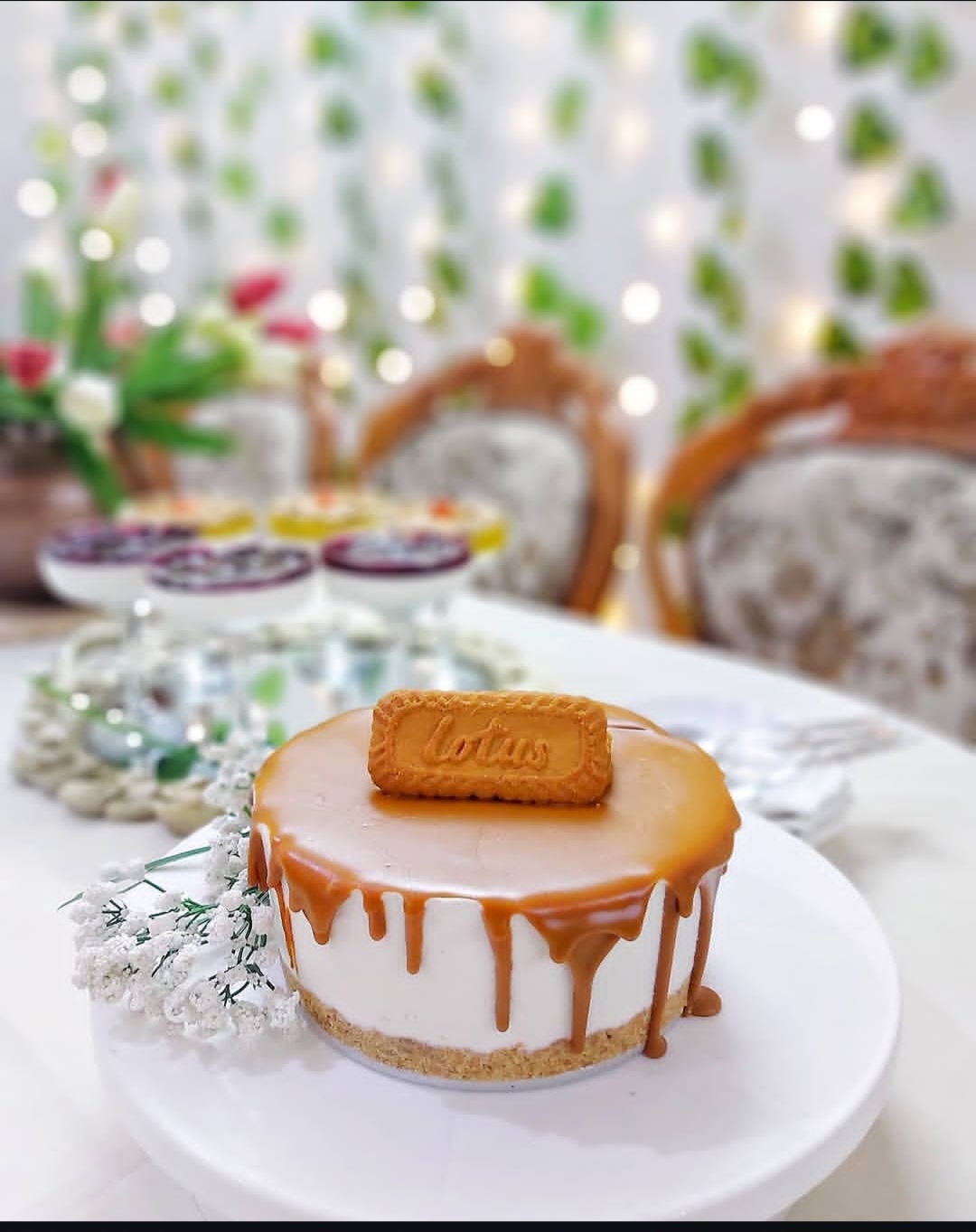
Base Layer: – 1 packet plain biscuits (about 200-250g) – ½ cup butter (about 100g), melted – 1 tablespoon cream or sweetened condensed milk (optional, for better binding)
Filling: – 1 pack cream cheese triangles (soft creamy cheese) – 1 cup yogurt (plain or Greek) – 1 small carton cream (قشطة)
Homemade Sweetened Condensed Milk (if not using ready-made): – ½ cup boiling water – 1 tablespoon butter – 1 cup powdered milk – 1 cup sugar – 1 teaspoon vanilla extract
Whipped Cream: – 1 cup heavy whipping cream (Rich cream) – ½ cup ice-cold water
To Set the Cake: – 4 tablespoons gelatin powder – ½ cup boiling water
For Topping (Optional): – Fresh blueberries – Lotus spread (Biscoff), melted over a warm water bath
Prepare the Base:
Make the Sweetened Condensed Milk (if needed):
Prepare the Cheesecake Filling:
Whip the Cream:
Add the Gelatin:
Assemble and Chill:
Topping:
from soleimahussein
Ukrainian President Volodymyr Zelenskyy just made it clear: the U.S. must get tougher on Vladimir Putin — now. In a recent interview, Zelenskyy urged President Donald Trump to apply even more pressure on Russia, warning that the war in Ukraine is escalating again as Russian forces target civilian infrastructure
https://www.change.org/p/stand-with-zelensky-demand-the-u-s-increase-pressure-on-putin
from soleimahussein
The pro-life view isn't just a feeling or personal preference. It's not merely a belief that some people hold. It is supported by very good reasons. It is based on a fact of science and a principle of justice
https://www.mccl.org/why-pro-life
from soleimahussein
1M Followers, 874 Following, 10K Posts – VOX 🇪🇸 (@vox_es) on Instagram: “Síguenos en nuestro canal de YouTube ⬇️”
https://www.instagram.com/vox_es/
from soleimahussein
Danmark har brug for en borgerlig regering. En borgerlig regering, som bygger på en fundamental tro på, at politik skal laves med danskerne og fællesskabet i centrum
https://borgerligtfundament.dk/
from Anghamelkhalili
I am a mother of two children, doing everything I can to provide a safe and stable home for my family. I never liked asking for help, but my circumstances have pushed me to look for any honest way to secure rent for a home.
That is why I created a food blog where I share my recipes and cooking. I did not do this for luxury or personal comfort. I did it because I am trying to earn money through my own efforts and provide a home for myself and my children.
I know the amount I need may seem large, but the reality is that housing costs are very high. What I am asking for is not a luxury—it is simply a chance for my family to live safely under a roof.
If you are unable to donate, sharing my story or my blog with others would mean a great deal to me and could help me reach someone who is able to help.
Thank you to everyone who takes the time to read, share, or keep us in their thoughts. https://chuffed.org/project/148450
from soleimahussein
Mohamed Bailor Jalloh entered a classroom at Old Dominion University in Virginia and asked if it was a ROTC class. Upon learning that it was, he yelled “Allahu Akhbar” and started shooting
https://gatesofvienna.net/2026/05/the-bureau-of-missed-clues-strikes-again/